
The best Korean vocabulary app is the one that schedules reviews with spaced repetition, plays audio and shows example sentences, and the main choice is between ready-made decks and tools where you build your own. This page compares six well-known options on those checks, gives each an honest drawback and ends with a 10-minute trial that tests any app on 20 words. It uses no ratings, scores or affiliate links.
Key facts
- Spaced-repetition scheduling is the main criterion: the app shows a word again just before you would forget it.
- Audio and a sentence on every card matter, because Korean particles and endings need context.
- Community decks vary in accuracy, so check a new deck against a dictionary.
- Plans and prices change, so check the store listing before you pay.
Last updated: 2026-10-09.
Best Korean Vocabulary App: the Essentials
Choose by how you want to get your words. There are two routes. In the ready-made route, someone else made the deck or course, and you study it at once. In the custom route, you make cards from the words you meet, and the app schedules them. The ready-made route is faster to start. The custom route fits your own life, because you review words you chose.
Spaced repetition is the method behind the best apps. It shows a card again after a growing gap (for example 1 day, then 3 days, then a week) and shortens the gap when you forget. This is more efficient than reading a list again and again, so it is the main thing to look for.
Our top picks
| Situation | Pick | Why |
|---|---|---|
| Best scheduling and custom cards | Anki | A powerful, flexible spaced-repetition system |
| Best for ready-made courses with voices | Memrise | Courses include short clips of people saying the words |
| Best for learning words inside sentences | Clozemaster | Practice is built on fill-in-the-blank sentences |
These are editorial judgements based on the checks below, not scores. Each pick has a drawback, given in its section.
How Did We Choose?
We compared each app on six criteria, listed from the most important to the least. The page does not run hands-on tests and gives no scores. It compares what each publisher says in its public description and what is widely known about the app, and it asks you to check the store listing for current details.
- Spaced-repetition scheduling. Does the app decide when each card returns, and does it adapt when you answer wrong?
- Audio and sentence context. Does each word have audio, and does it appear in a sentence?
- Deck quality and level tags. Are the ready-made decks accurate, and are they tagged by level, such as beginner or TOPIK level?
- Custom card creation. Can you add your own words, audio and sentences?
- Cross-device sync. Can you study on a phone and a computer with the same progress?
- Cost. What is free, and what does a paid plan add?
An app that scores well on the first criterion but fails on the second can still teach you words you cannot say. Use the criteria together.
1. Anki: Best for Scheduling and Custom Cards
Anki is the best vocabulary app for serious long-term memory, because its scheduling is flexible and you control every card. Specs: flashcard app; free on Windows, Mac, Linux and Android; the iPhone and iPad app is paid; syncs through a free AnkiWeb account.
Anki shows each card again at an interval that depends on how well you remembered it. You can add audio, pictures and sentences to a card and change the daily limits. Shared decks exist for Korean, from beginner lists to textbook vocabulary.
The drawback is setup effort. A new user must learn how to add cards, how to set daily limits and how to avoid a growing pile of due cards. Shared decks vary in accuracy, and the iPhone app costs money, so check the current price.
Choose it if you want control and plan to study for months. Skip it if you want a ready-made course with lessons and no setup.
2. Memrise: Best for Ready-Made Courses with Voices
Memrise is the best for ready-made vocabulary with real voices, because its courses use short clips of people saying the words. Specs: course and vocabulary app; part of the content is free; a paid plan unlocks more.
Hearing varied voices helps you catch the real rhythm of a word, although most of the video library is part of the paid plan, and the courses follow a set order, so you do not choose what to learn. It also has review sessions that bring words back. Check which courses and how much of each are free.
The drawback is control. You work through the courses as designed, with limited options for custom cards, and some content sits behind the paid plan. Courses also change over time.
Choose it if you want a ready-made path with varied voices. Skip it if you want to study words from your own reading.
3. Quizlet: Best for Quick Shared Sets
Quizlet is the best for starting in a minute, because a very large number of sets already exist, and you can search for one that matches your textbook. Specs: flashcard app; free with limits; a paid plan unlocks more study modes.
You can copy a set, edit it and study it with flashcards or quizzes. Teachers often share class sets, which is handy if you follow the same textbook. Which modes are free can change, so check what is included.
The drawback is accuracy and scheduling. Anyone can publish a set, so spelling, spacing and translations can be wrong. The scheduling is usually less strict than a dedicated spaced-repetition tool, and some modes are paid.
Choose it if you follow a textbook with a shared set. Skip it if you cannot check each card.
4. Clozemaster: Best for Words inside Sentences
Clozemaster is the best for learning words in sentence context, because every item is a sentence with a gap to fill. Specs: sentence-practice app; the free plan caps the number of sentences a day, and a paid Pro plan removes the cap; sentences come from large collections.
In a cloze exercise you see a sentence with one word missing, and you type or choose the word. This teaches you how a word behaves with particles and endings, which a single-word card hides. It suits learners who already know the alphabet and a few hundred words.
The drawback is difficulty at the start. A beginner can find sentences too hard, and the sentences come from large collections whose quality varies, so a few may sound unnatural. It is also not a course.
Choose it if you already read Hangul and want sentence practice. Skip it if you are a complete beginner.
5. Drops: Best for Short Visual Sessions
Drops is the best for a quick, light session, because each lasts a few minutes and uses pictures. Specs: vocabulary game; a limited free session each day; a paid plan removes the limit.
You see a picture, hear the word and tap to match. It is a pleasant way to learn concrete nouns such as 사과 (apple) and 물 (water). The free daily limit stops you from doing too much.
The drawback is that it teaches words in isolation. There are no sentences and no grammar, so you will not learn that you say 물을 마셔요 (I drink water) with the particle 을. The abstract words that real Korean needs are also harder to show with pictures.
Choose it if you want a light daily habit for nouns. Skip it if you need sentences or abstract words.
6. LingoDeer: Best for Words Tied to Grammar Lessons
LingoDeer is the best if you want vocabulary introduced alongside grammar, because the words appear in lessons with short notes. Specs: course app; some free lessons; a subscription unlocks the rest.
The vocabulary in each unit is used in the example sentences of that unit, so you see words in context from the start. A free user can try the first lessons.
The drawback is the paywall and the lack of a flexible review system. The review is tied to the course, so it is not a place to keep words from your own reading.
Choose it if you want vocabulary and grammar in one path. Skip it if you want a free tool or custom cards.
Which App Has the Best Scheduling?
Anki has the most flexible scheduling of the six, because you can set how many new cards come each day and how fast the gaps grow. The course apps use their own review schedules, which are simpler and less open to change. Quizlet's study modes are less strict than a true spaced-repetition system. If long-term memory is your main goal, choose Anki or another dedicated spaced-repetition tool. If a simple daily habit is your goal, a course app's built-in review is enough.
Which Has the Best Ready-Made Decks?
Memrise and LingoDeer offer ready-made material from the publisher, so their quality is more consistent. Quizlet and Anki have the largest libraries of shared sets, but quality varies from set to set. The rule is the same for all: check a new deck against a dictionary before you trust it. A ready-made deck is a good start, but it holds the words someone else chose.
The Deck-Source Warning
Community decks can contain errors in spelling, spacing and meaning. A typical error is a missing or wrong particle, a wrong verb ending or a word with the wrong meaning. Check ten cards from any new deck in a dictionary, such as the Standard Korean Language Dictionary (표준국어대사전) of the National Institute of Korean Language, before you add the deck. If more than one of the ten is wrong, find another deck.
Which Suits Custom Cards?
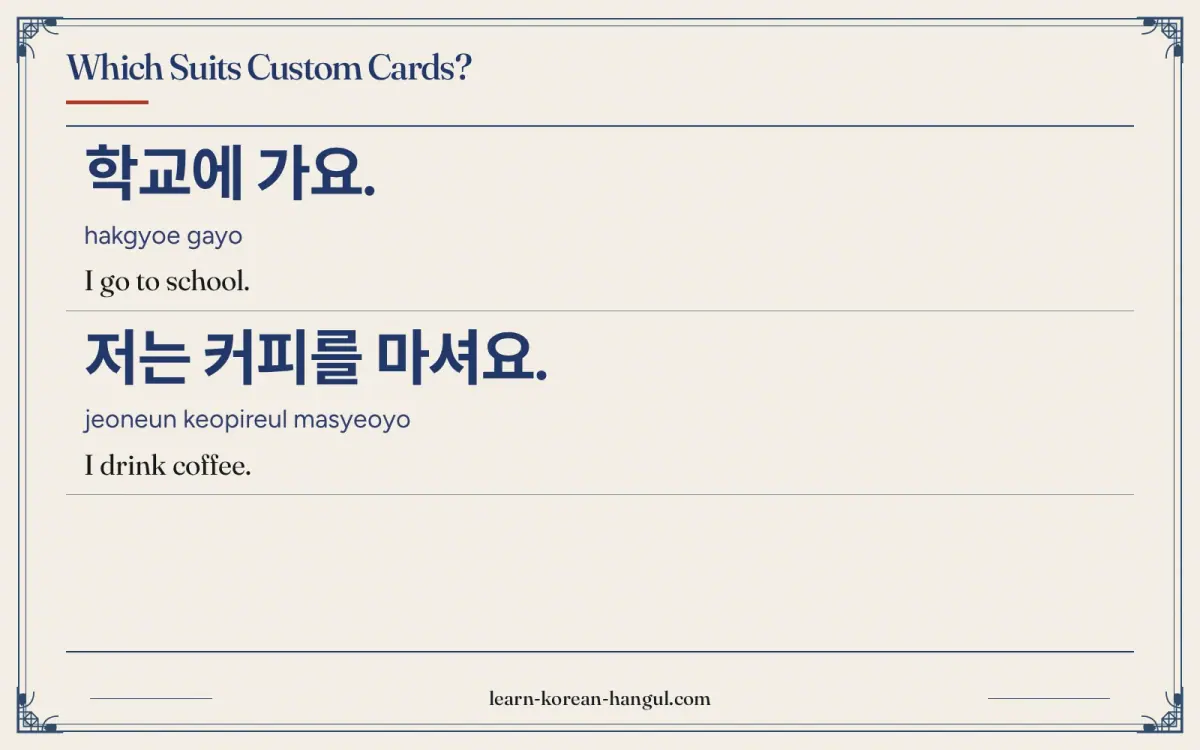
Anki suits custom cards best, because it lets you add audio, a sentence and a picture and change the card layout. Quizlet also lets you make cards easily, with fewer options. Course apps usually do not let you add your own words. A custom card is worth the effort, because you remember words from your own life, such as a word you met on a sign, better than words from a list.
A good custom card has four parts: the word, its meaning, audio and one short sentence. Compare a word card with a sentence card.
| Card type | Front | Back | What it teaches |
|---|---|---|---|
| Word card | 학교 | school (hakgyo) | the meaning only |
| Sentence card | 학교에 가요. | I go to school. (hakgyoe gayo) | the word and the particle 에 |
The sentence card shows that 학교 takes the particle 에 with the verb 가다. The word card does not. Korean particles (은/는, 이/가, 을/를, 에) change with the sentence, so a sentence card teaches you more than a word card for the same effort.
학교에 가요.
hakgyoe gayo
I go to school.
저는 커피를 마셔요.
jeoneun keopireul masyeoyo
I drink coffee.
The 10-Minute Trial: 20 Words and a 24-Hour Test
You can test any app in 10 minutes, with a recall test the next day. Use the same 20 words for each app so that the results compare fairly.
- Pick 20 words. Choose common nouns and verbs, such as 물, 책, 학교, 먹다 and 가다. Write them on paper first.
- Study for 10 minutes. That is 30 seconds a word (10 minutes × 60 seconds ÷ 20 words). Use the app's normal method, with audio on.
- Wait 24 hours. Do not review in between.
- Test yourself. Cover the meanings and say or write each word's meaning. Note how many you remember, and whether you can say the word aloud.
- Compare. The app after which you remember more words is the better fit for you, whatever its popularity.
Add a second check: did the app show you at least one example sentence per word? An app that scores well on recall but never shows a sentence may leave you unable to use the words.
Sentence Cards or Word Cards?
Use both, in a simple order. Begin with word cards for the first 100 words or so, because you need basic nouns before sentences make sense. After that, make sentence cards for every new verb, adjective and particle pattern. Sentence cards teach words that change form, such as 가다 → 가요, and the particles that follow nouns. A learner who has only word cards can often recognise a word but cannot use it in a sentence.
A practical rule is to put the sentence on the front, with the target word shown in bold or with a gap, and the meaning on the back. Keep the sentence short, ideally under eight syllables when you start.
How Do Level Tags and TOPIK Tie In?
Some decks are tagged by level, such as beginner, intermediate or TOPIK level 1 and 2. A level tag is a useful way to choose words in the order you will meet them. Treat the number of words per level as an estimate commonly cited by teachers and textbooks, not an official figure. The TOPIK exam is run by the National Institute for International Education (NIIED), and its official information is on topik.go.kr. A deck tagged for TOPIK is a study aid, and it does not replace the official exam information.
How to Build a Good Custom Card in Five Steps
Whatever tool you use, a custom card works best when it follows the same pattern. Follow these steps for each new word.
- Copy the word from a reliable source. Check the spelling in a dictionary, because a wrong spelling on a card is hard to unlearn.
- Write one meaning. If a word has several meanings, make one card for the meaning you met. For instance, 배 means "stomach", "pear" or "ship", and one card per meaning avoids confusion.
- Add one short sentence. Use a sentence you read or heard, or write a simple one such as 배가 아파요 (my stomach hurts). Keep it short.
- Add audio. Record yourself, or copy audio from a trusted source. The sound of a word is as much a part of the card as its spelling.
- Leave out romanization. A Roman-letter guess on the back lets you read the answer without reading Hangul. Add a note only for a sound that spelling does not show, such as [학꾜] for 학교.
Five steps take about two minutes per card. At 10 new cards a day, that is about 20 minutes of card-making a day, so many learners choose to batch the work and make 30 cards once a week instead. Either approach works, so long as the cards stay accurate.
Mistakes That Waste Review Time
Four habits make a vocabulary app less useful than it should be.
- Too many new cards. Adding 50 cards a day feels productive until the reviews come due. Reviews grow with every new card, so a large batch today becomes a pile next week. Keep new cards to a number you can review in 15 minutes.
- Cards with several facts. A card that asks for the meaning, the spelling and a sentence at once is hard to answer. Ask one thing per card.
- Skipping the speaking. Reading a card silently trains recognition only. Say the Korean word aloud each time, because production is what you need in conversation.
- Never deleting cards. A card that you have failed many times is probably badly made. Rewrite it with a clearer sentence, or delete it.
A Weekly Routine with a Spaced-Repetition App
This routine fits most schedules. It uses one course or textbook for new words and one app for review.
| Day | Task | Time |
|---|---|---|
| Monday to Friday | Reviews first, then add 10 new cards | 15 minutes |
| Saturday | Reviews, then write three sentences using the week's words | 20 minutes |
| Sunday | Reviews only, and clean up cards you keep missing | 10 minutes |
The total is 105 minutes a week (5 days × 15 minutes + 20 minutes + 10 minutes), or 1 hour 45 minutes. That adds 50 new cards a week from Monday to Friday, about 200 in four weeks. If you want a faster pace, raise the number of new cards slowly, one or two at a time, and watch your reviews.
Does Sync and Offline Use Matter?
Sync matters more than it seems. A vocabulary habit survives when you can review on your phone in a queue and add cards on a computer at your desk. Anki syncs through a free AnkiWeb account, and course apps sync through their own accounts. Test the sync once in the first week: add a card on one device and check that it appears on the other. For offline use, check that your cards and audio are stored on the device, so a commute without signal does not break your streak of reviews. Apps differ on what works offline, and the answer can change with a plan, so check before a long trip.
Which Should You Pick?
Match your situation to a pick.
- You want long-term memory and control. Choose Anki, and make sentence cards from your own reading.
- You want a ready-made start with voices. Choose Memrise, and check what is free.
- You follow a textbook. Search for a shared Quizlet set for your chapter, and check ten cards.
- You already read Hangul and want sentences. Choose Clozemaster.
- You have only a few minutes. Choose Drops for nouns, and add a sentence deck later.
- You want vocabulary and grammar together. Try the free lessons of LingoDeer.
A realistic pace is 10 new words a day, which gives about 300 words in 30 days if you study every day. If your daily reviews take more than about 15 minutes, lower the number of new words. For ready-made cards, browse the Korean vocabulary flashcards on this site, and compare other free options in the best apps to learn Korean for free.
Frequently Asked Questions
Is Anki better than Quizlet for Korean? For long-term memory, Anki usually is, because its scheduling is stricter and more flexible, and you can add audio and sentences. Quizlet is faster to start and has many shared sets, which helps if you follow a textbook. Whichever you choose, check each shared card for spelling and meaning.
How many words per day? A common range among teachers is 10 to 20 new words a day. Start with 10, which gives about 300 words in 30 days, and raise the number only when your daily reviews take less than about 15 minutes. If reviews pile up, lower the number of new cards.
Do I need audio? Yes. Korean spelling does not always show how a word is said, and a word learned without audio is easy to say wrongly. For example, 학교 is said [학꾜] and 꽃 is said [꼳]. Choose an app with audio on every card, or add audio to your own cards.
Are community decks accurate? Not always. Anyone can publish a deck, so spelling, spacing and meanings can be wrong. Check ten cards in a dictionary before you add a deck, and prefer decks that include sentences and audio from a source you trust.