How Do You Use the Korean Character Counter?
Paste the text, choose the destination's counting unit, set an optional limit, and check the counts before copying a summary. Your text remains available when you compare normalization or pinspect a transformation. No Korean keyboard installation, account or document upload is required for ordinary counting.
- Paste or choose a source. Enter text into the labelled editor, or choose Files for a text document. The checkpoint is that the source is the version you intend to submit. Avoid deleting unusual spaces before inspection: an invisible character may explain a disagreement with the destination's count.
- Select the counting unit. Teacher view emphasizes graphemes, whitespace, eojeol, bytes, lines and syllables; Developer view exposes storage units. The checkpoint is that the unit beside the target matches the destination's rule. “Characters” alone is insufficient because emoji and decomposed Hangul can occupy several storage units.
- Enter a whole-number target. A remaining amount means the selected count is below the target; At limit means exact equality. The checkpoint is a valid positive integer from one to one billion. Avoid entering a decimal or a formatted thousands separator; the target input expects plain integer digits.
- Compare and copy a receipt. Copy summary or export the settings and labelled counts. The checkpoint is that another person can reproduce the unit, whitespace policy and normalization choice. Copying a bare number loses those assumptions, which can matter as much as the text itself.
Pick the Destination's Unit before Editing
An assignment may exclude spaces, while a technical form may validate encoded bytes. Use the destination's documented policy when available, and test a short example there when it is ambiguous. This counter never deletes text automatically after a limit is exceeded. It gives a measurement and an explanation so you can make the editing decision yourself.
Characters, Syllables and Storage Units

A character count needs a named unit. A grapheme cluster is a segmented text unit that usually corresponds to one perceived character; a code point identifies a Unicode value; a UTF-16 unit is one sixteen-bit element of a JavaScript string. Encoded bytes measure the storage representation rather than the appearance of the text.
| Unit | 한글 | 😀 | What the result measures |
|---|---|---|---|
| Grapheme clusters | 2 | 1 | Browser extended-grapheme segmentation |
| Unicode code points | 2 | 1 | Values found by iterating the string |
| UTF-16 units | 2 | 2 | JavaScript string length |
| UTF-8 bytes | 6 | 4 | Actual UTF-8 encoding length |
| Eojeol | 1 | 1 | Non-whitespace runs under the selected policy |
What Does a Korean Character Mean?
The phrase can mean a displayed syllable block, a component letter or a technical storage unit. In 한글, two visible blocks are two grapheme clusters and two precomposed code points. Each occupies three UTF-8 bytes. A decomposed spelling of the same blocks can preserve the appearance while increasing code-point and byte counts.
Grapheme clusters can also be invisible. A zero-width space is still a segmented unit even though it does not paint a visible letter. The interface uses “visible” as a practical shorthand; the Inspector provides the exact explanation for characters that do not have an obvious glyph.
How Many Letters Are inside One Hangul Block?
A modern Hangul block contains an initial consonant, a vowel and optionally a final consonant. Those components are jamo. This counter reports decomposition slots, so a block without a final contributes two slots and a block with a final contributes three. A compound final is one Unicode final slot, even if its written shape contains more than one consonant component.
The syllable count recognizes modern precomposed blocks and valid conjoining-jamo sequences after a derived Hangul inspection. It does not treat arbitrary compatibility letters as a completed block. Hangul Unicode explains the composition formula and the difference between stored letters and finished syllables.
Why Can Two Counters Give Different Totals?

Two counters can disagree because they measure different units, exclude different whitespace, normalize the text differently or handle line endings differently. A disagreement is not enough to identify a faulty counter. Reproduce the exact input and the policies first; then compare the unit definitions rather than choosing whichever total looks preferable.
The default preserves the editor snapshot and uses Unicode White_Space. No-whitespace graphemes exclude only clusters made entirely of that property. ASCII-space-only instead excludes U+0020, leaving tabs and other spaces in the count. ECMAScript whitespace additionally treats the byte-order-mark character as whitespace. The settings label makes each choice explicit.
Original Text and NFC Comparison
NFC is canonical normalization: it can compose a valid initial-plus-vowel Hangul sequence into one precomposed block, and it can compose a base Latin letter with a combining accent. The Transform view displays the derived text and its code-point and UTF-8 deltas before Apply. Undo preserves an earlier original after a deliberate application.
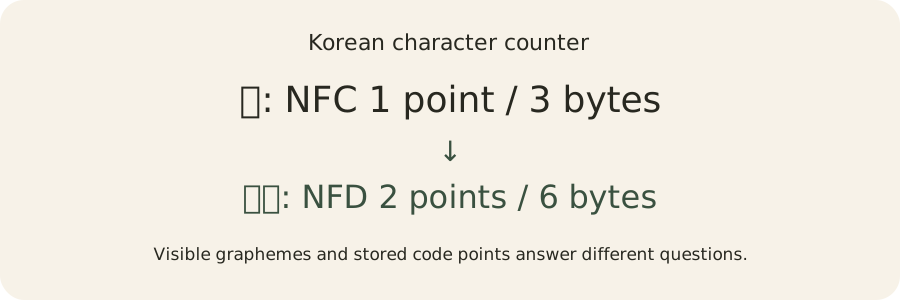
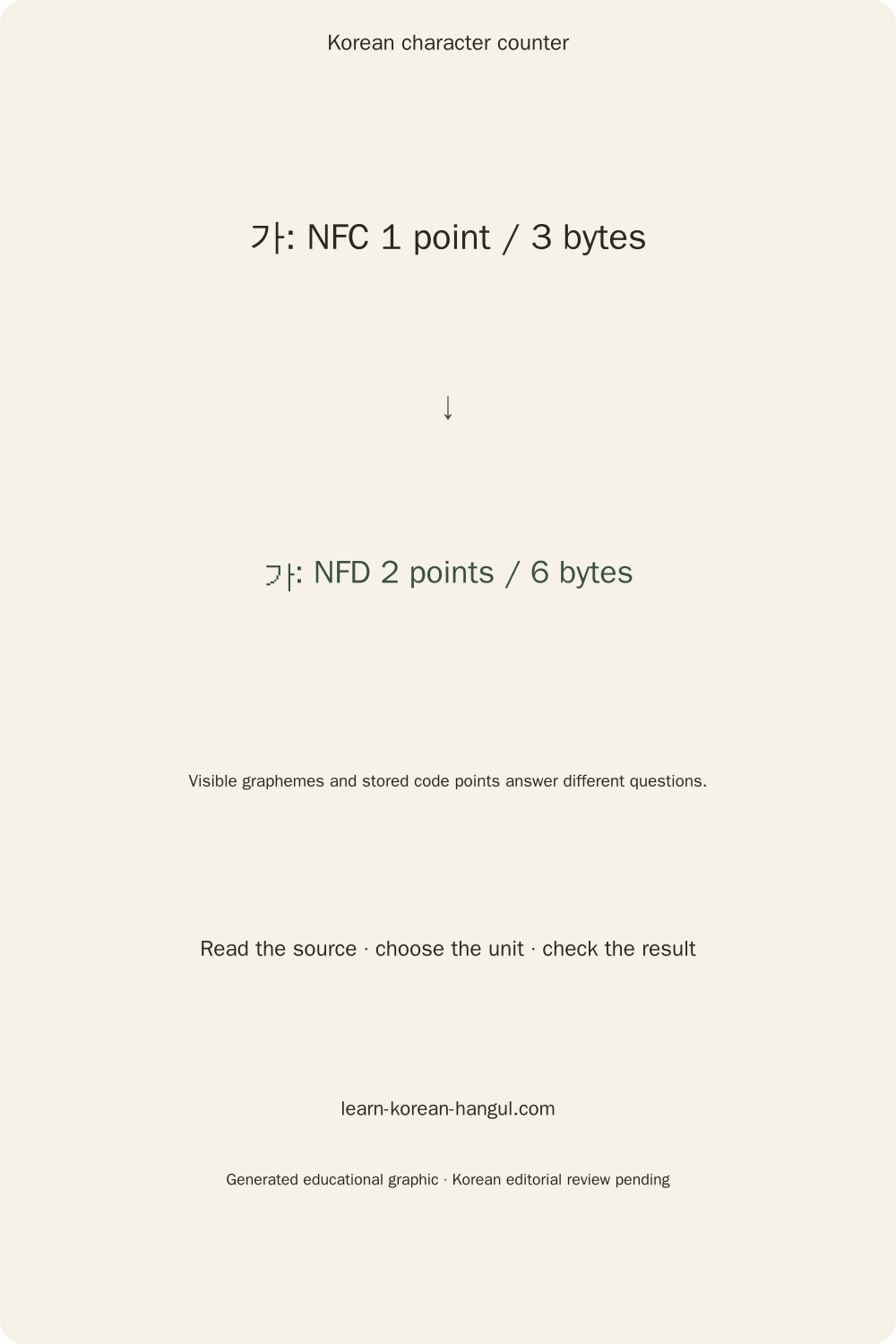
For example, conjoining 가 occupies one grapheme, two code points and six UTF-8 bytes; NFC 가 occupies one grapheme, one code point and three bytes. Compatibility ㄱㅏ stays unchanged under NFC. Normalization is not a Korean keyboard composer and does not guess that those two compatibility letters should become a syllable.
Newline comparison is similarly explicit. Original CRLF uses two code points but one grapheme boundary unit. LF uses one code point. A textarea or clipboard can already change line endings before this page sees the text, so exact file-source inspection is the right method when original bytes matter.
Korean Word Counts and Eojeol

The counter's everyday “word” equivalent is labelled eojeol: maximal runs separated by the selected whitespace rule. Punctuation remains attached to its run. This is an authored counting policy useful for reproducible text measurements; it is not a claim that spacing reveals every linguistic word in Korean.
Korean particles and endings can be attached to another unit without a space. A whitespace-based counter therefore cannot decide whether a run contains one lexical item or several grammatical components. Counting those components requires a morphological analyzer, a chosen grouping policy and language check. The ordinary eojeol total remains available without downloading a language model.
Can Spaces Measure Korean Words?
Spaces measure spacing units, which are useful for comparing similarly formatted saved texts. They do not establish a universal linguistic word count. For example, 한 글 contributes two runs while 한글 contributes one. The difference follows the input's whitespace, not a dictionary judgment about the best spelling or meaning.
Line breaks and tabs also separate runs under the default White_Space policy. Zero-width space and U+FEFF do not, so 한\u200B글 and 한\uFEFF글 remain one eojeol even though they contain extra code points. The Inspector names these hidden values so that you can explain the result instead of silently removing them.
Morpheme and Lexical-Token Estimates
The current standard counts do not infer morphemes, lemmas or parts of speech. Those advanced analyses require the shared local morphology engine and a defined policy for including particles, endings, affixes and unknown forms. A future analyzer result must identify its model version and uncertainty; it must not relabel whitespace counts as linguistic analysis.
Frequency currently counts surface eojeol, with optional case sensitivity, minimum length and an explicitly supplied stopword list. Surrounding punctuation is stripped for this surface report. Attached grammatical forms stay distinct unless the source text itself makes them identical. For help understanding where spaces belong, Korean spacing rules explain the writing conventions behind the boundary.
How Many Bytes Does Korean Text Use?

A modern precomposed Hangul syllable occupies three bytes in UTF-8, but that rule does not describe every Korean-related string or encoding. Conjoining jamo, Latin accents, emoji and legacy encodings have different representations. The byte result names the encoding so that a rough convention cannot be mistaken for actual stored bytes.
UTF-8 uses one byte for ASCII code points, two for values from U+0080 through U+07FF, three for most remaining Basic Multilingual Plane values, and four for supplementary code points. JavaScript's TextEncoder produces these bytes. An isolated surrogate is malformed Unicode; TextEncoder replaces it with U+FFFD, occupying three bytes, and the Inspector reports the malformed original.
UTF-8, Strict EUC-KR and CP949
Strict EUC-KR in this tool means ASCII plus assigned KS X 1001 two-byte pairs in the A1–FE lead and trail range. Its repertoire contains 2,350 modern Hangul syllables. WHATWG EUC-KR is the web-compatible mapping commonly associated with CP949 extensions. Both names remain visible because their representable text can differ.
The modern syllable 힣 cannot be represented by the strict repertoire, but the web-compatible mapping encodes it as hexadecimal C6 52, two bytes. The word 한글 uses C7 D1 B1 DB in both, four bytes. Emoji 😀 is unencodable in both. An unsuccessful encoding shows no valid total, together with the unsupported scalar and its offset.
The maps use the WHATWG Encoding Standard index, dated September 18, 2024. The strict repertoire is independently corroborated with Python's standard-library EUC-KR decoder and the historical Unicode KSC5601 table. Every web-map pair is checked against Chromium's TextDecoder and Python's CP949 encoder. This documents the mapping implementation; it does not guarantee a destination uses the same edition.
Two-Byte Conventions and Unsupported Characters
Rough ASCII-one/non-ASCII-two is a separately labelled estimate for comparison with destinations using that convention. It cannot establish encodability. It assigns two estimated bytes to an emoji even though neither legacy encoding can represent that emoji. Use the genuine encoding mode when the destination requires real bytes.
An optional replacement simulation substitutes ? for unsupported scalars and labels the result lossy. It is a diagnostic pcheck, not a successful exact encoding. Check unsupported values individually before deciding whether removal, normalization or a different submission format is appropriate.
Worked Examples with Korean Text and Emoji
These four examples preserve their originals and use Unicode White_Space. Each names its input, result and practical interpretation. The same appearance can occupy different storage, so a worked example is most useful when it includes the unit rather than a solitary number.
Example 1: Count a Composed Hangul Word
Input: 한글. Results: two grapheme clusters, two code points, two UTF-16 units, six UTF-8 bytes, one eojeol and one line. Why: two modern blocks are stored separately, while no whitespace divides them. Best metric: graphemes for a visible-character assignment, or the named encoding's bytes for a technical form. A target of two graphemes is exactly at limit; a target of five UTF-8 bytes is one byte over.
Example 2: Compare Decomposed Hangul
Input: 가. Results: one grapheme, two code points, two UTF-16 units and six UTF-8 bytes. NFC pcheck: 가, one grapheme, one code point and three bytes. Why: valid conjoining letters form one segmented syllable but retain separate stored values in the original. Best metric: preserve original bytes when diagnosing a destination; apply NFC only after checking that normalization is allowed.
Example 3: Inspect a Windows-Style Line Break
Input: 한\r\n글, with an actual CRLF delimiter. Results: three graphemes, four code points, four UTF-16 units, eight UTF-8 bytes, two eojeol and two lines. LF pcheck: seven UTF-8 bytes and three code points, with the same grapheme and line totals. Why: CRLF is one delimiter containing two code points. Best metric: the destination's documented newline and byte policy; file inspection preserves information that browser paste may already have altered.
Example 4: Count a Family Emoji
Input: 👨👩👧👦. Results: one grapheme, seven code points, eleven UTF-16 units and twenty-five UTF-8 bytes. Why: joined emoji components and zero-width joiners participate in a single extended grapheme. Best metric: graphemes when a displayed symbol counts as one; storage units or bytes when the destination validates those units. Deleting joiners changes the emoji's structure, so never remove every invisible value as a generic cleanup.
How Do You Check a Character or Byte Limit?

Choose the metric, enter a target, and compare used with remaining. The formula is remaining = target − used; overage is max(0, used − target); percentage is 100 × used ÷ target, displayed to one decimal place. Equality displays At limit. Nothing is silently truncated.
Example presets include 500, 1,000 and 2,000 characters, and 60-character title or 155-character description writing targets. These are editable examples, not promises about search-result display width or institutional eligibility. A 200-character manuscript estimate divides the grapheme count by 200; rounded-up sheets use the mathematical ceiling, which differs from a printed layout with paragraph and punctuation rules.
Destination Settings and Line Endings
Save or share the metric, target, whitespace, normalization and newline settings to make a destination worksheet. Settings-only links contain no pasted text. A label beside the count identifies whether the selected snapshot is original or derived. Count receipts are especially useful when a teacher or developer needs to reproduce why two systems differ.
X weighted length uses the pinned twitter-text 3.1.0 v3 policy, including URL and emoji handling. It is a platform-policy snapshot, so verify current acceptance on the platform itself. SMS and LMS 90-byte and 2,000-byte examples are editable planning targets; carrier encodings and delivery rules differ. Choose an actual legacy encoding for an applicable byte comparison and do not infer message costs or delivery eligibility from this page.
File Reports, Transformations and Private Saved Texts
Files accepts local .txt, .md, .json and .csv documents through a picker or drag and drop. Raw text is the default. JSON string-values extraction counts only selected string values, joined with line breaks; CSV cell extraction removes the serialization delimiters and similarly joins cells. Extraction therefore changes the counted source and is explicitly named in the report.
Why Is a File Size Different from Its Text Size?
A source file can include a byte-order mark, use UTF-16, or contain JSON keys and punctuation that an extraction policy excludes. Its original byte size is therefore distinct from the decoded text's UTF-8 length. The file report shows source bytes, decoded text bytes and normalized text bytes separately. Totals sum per-file counts without inventing separators between files.
Import detects UTF-8 and UTF-16 byte-order marks, with explicit decoding choices available. Malformed input reports an error for that file while retaining successful reports. Cancel interrupts file reading and preserves completed results. The limits are 100 MiB per file, one hundred files and 500 MiB total; they are working-memory limits rather than revenue quotas.
Transforms pcheck NFC, newline conversion, UPPER, lower, Title, Sentence, camelCase, snake_case and kebab-case. Hangul has no Latin case conversion; Spanish accents retain their letters. Code-case transformations can change separators, so inspect the pcheck before Apply. Undo restores an earlier original. Reading and speaking estimates use ceil(60 × count ÷ rate) with an editable rate, rather than claiming a measured Korean learner speed.
Text persistence is off by default. Save text locally is a deliberate browser-storage action; Load and Delete are separate controls. ENEX export provides a local file for manual Evernote import without cloud sign-in. Clipboard and storage denial have visible guidance, while ordinary counting continues to work.
When Should You Use a Different Tool?
Use this counter to measure text length and diagnose unit differences. Use language lessons or a spelling resource to decide whether the Korean is appropriate. A short text can meet a character target and still contain errors; a count cannot establish a TOPIK writing score, a translation's quality or a learner's proficiency.
Manuscript pages are arithmetic estimates, not a complete ruled-paper layout. Morphology needs a morphology analyzer, and image or media transcription needs an extraction tool followed by transcript correction. Those tasks should not be simulated through a text-length heuristic. Korean writing prompts provide practice goals; Hangul writing practice helps with the formation of readable blocks.
Inspect Hidden Characters before Removing Them
Inspect spaces, non-breaking spaces, zero-width characters, byte-order marks, fillers, joiners, variation selectors and directional controls by name and offset. Some affect appearance or structure intentionally. An emoji joiner is not a spelling error, and a bidirectional control should be assessed in context rather than rendered as an unexplained blank.
The original remains the reference. Compare a specific transformation and its count deltas before applying it. This gives a better diagnosis than deleting all invisible characters or converting compatibility letters without permission.
Import Local Speech or Document Text
Choose Advanced in View to transcribe a short audio recording or read an image or PDF page. Speech recognition requires an explicit model download with the size shown. Cancel interrupts the job; Delete Model removes the cached pack. Correct the editable text, then choose Use Transcript or Use Extracted Text to apply it to the counter. Undo restores the earlier source. Korean speech recognition is limited to 60-second excerpts and never rates pronunciation. Embedded PDF text can be extracted without an OCR model; scanned pages require a separate explicit OCR action.
Return to the korean character counter to compare the corrected text under the same count policy.
Frequently Asked Questions
Does the counter delete text that exceeds my limit?
No. The target reports remaining capacity, exact equality or overage without truncating your source. For example, 한글 uses six UTF-8 bytes, so a five-byte target reports one byte over. Choose the destination metric before editing; meeting a grapheme target does not automatically satisfy a byte target.
Can the counter tell me my TOPIK writing score?
No. Text length is only a measurement and cannot assess grammar, organization, task completion or vocabulary. The counter can help you practise within a chosen length target, but an exam score needs the applicable rubric and qualified evaluation. No count here guarantees a TOPIK result or eligibility.
Will punctuation occupy manuscript squares?
Actual manuscript layout can give punctuation its own square and can have additional rules at line endings or paragraph starts. This tool only divides the selected character count by two hundred and optionally rounds up sheets. Use a ruled-paper layout or teacher instructions when physical placement matters.
Can I compare several files without uploading them?
Yes. Files are read locally after you choose them, and reports retain each source byte size beside decoded text counts. Batch totals sum the per-file counts without inserted separators. The picker accepts text, Markdown, JSON and CSV; choose raw text or explicitly select the supported extraction policy.
What happens if my clipboard blocks copying?
The page shows manual-copy guidance instead of reporting success. Select the source, transformed preview or labelled report and use your browser copy command. You can also download a report file. Clipboard permission affects that action only; it does not require uploading your text or prevent local counting.
Does my text remain after I close the tab?
Ordinary typing does not save a text. The explicit Save text locally action writes a browser text that Load can retrieve, while Delete removes it. Browser storage may be denied or cleared, so download important work separately. Clear removes current memory; saved-text deletion is a separate deliberate action.
Korean Character Counter Sources and Next Steps
The Korean character counter uses browser Intl.Segmenter for extended graphemes and sentence estimates, JavaScript code-point iteration for scalars, and TextEncoder for UTF-8. Browser segmentation follows the runtime's Unicode implementation; the report identifies that dependency instead of claiming an undiscoverable version. Unicode normalization defines NFC, and Unicode text segmentation explains grapheme boundaries.
The default whitespace, eojeol, paragraph and terminal-line policies are stated above so that exported receipts are reproducible. When checking a form limit, record the selected count unit and whether spaces are included. If a destination gives a different total, compare its handling of line breaks, emoji and accented letters before changing your text. Use the site's correction channel for a specific discrepancy, sharing an example only if you choose to disclose it.
Continue with the Korean learning tools for the next writing task. Keep the original, choose the destination's unit and carry the policy alongside the number. That is the practical purpose of a Korean character counter when appearance, spacing and storage disagree.