Key facts
- The internal keyboard follows the two-set layout. Native input accepts the Korean input method selected on your own device.
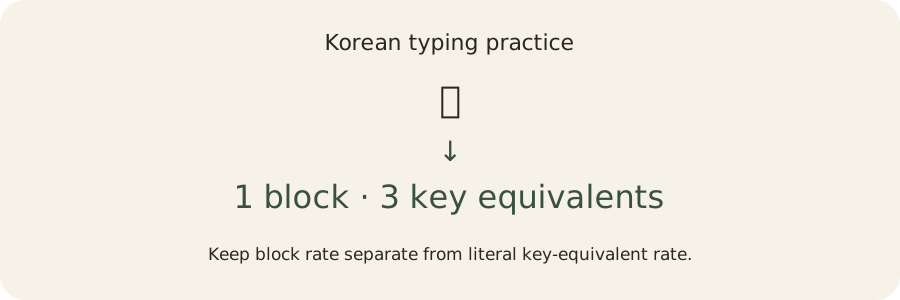
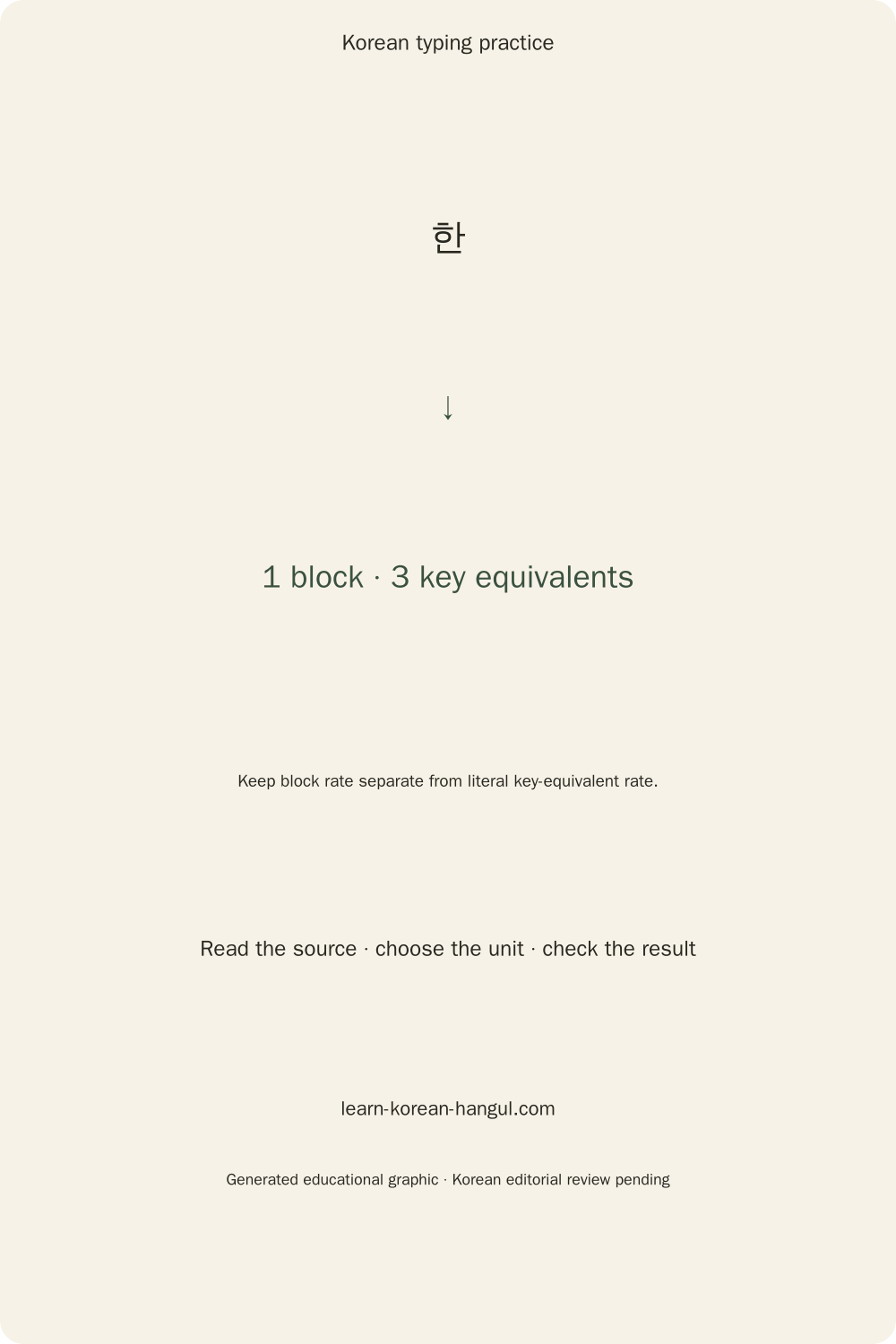
- 한 is one syllable block and requires three character-producing two-set actions: g, k and s.
- Keyboard-equivalent strokes are reconstructed from correct text; they are not a count of every physical key you pressed.
- Composition saved texts are excluded while the input method is still assembling a Korean syllable.
- Progress saving is optional. Custom text is private and excluded from challenge links and result cards.
- Repeat a passage to compare your speed and accuracy. Your results describe typing practice, rather than language proficiency.
How to Use Korean Typing Practice
Choose a lesson stage and input mode, type the persistent target, then inspect the spelling feedback and result units. Begin untimed when learning a layout; use Test only when you want a timed record under a particular set of conditions. The clock starts with input, so opening the page or editing settings does not consume test time.
- Choose a task. Practice uses a selected lesson stage; Test adds a duration; Games presents a separate activity. Open Edit for word-count, passage and zen options. The checkpoint is a visible target matching the selected stage. A common mistake is assuming a timer is required for every drill.
- Verify input. Native OS IME expects your system keyboard to produce Hangul. Physical QWERTY mode maps letter positions inside the browser; touch mode offers large on-screen keys. The checkpoint is the first character appearing once in the input field. Avoid enabling two different composers at the same time.
- Type with the target visible. Check / Next assesses a page and advances a longer passage. Finish ends a session after the active composition completes. The checkpoint is a completed spelling, not merely a visually similar Latin label. Avoid submitting while the input method is still regrouping a syllable.
- Review the result. Compare correct blocks, key-equivalents and accuracy, then use Details to inspect component errors. Reset repeats the selected passage. The checkpoint is an explanation of which written position changed. Avoid treating a corrected final answer as proof that the first attempt was error-free.
The same practice can support keyboard learning and measurement, but those purposes need different settings. Choose the input category before interpreting a speed number.
Which Input Mode Should You Choose?
Choose native input when practising the keyboard you use in other applications, and browser two-set input when you want a no-install letter-position drill. Touch input is a separate learning category because selecting displayed letters differs from using a physical keyboard.
| Mode | Input source | Suitable comparison |
|---|---|---|
| Native OS IME | The device's selected Korean input method | Same device, input method and passage |
| Physical QWERTY → Hangul | Browser mapping of physical letter positions | Other physical two-set runs with equal settings |
| Large on-screen keys | Paged consonant/vowel key bank | Similar touch practice, not desktop physical speed |
Native mode supports the user's chosen phone layout, including input methods whose internal actions differ from two-set. The published key-equivalent count still describes the standard two-set spelling sequence rather than reconstructing unknown touch gestures. The result labels its input category so these interpretations remain visible.
The browser cannot reliably list installed input methods. Latin letters in Native mode are a reason to check the OS language switch, not proof that no Korean keyboard exists. Use the Korean keyboard layout reference to identify the standard positions. Assisted phonetic candidate input requires a separately candidate engine and is not offered in this build.
Learn the Hangul Keyboard in Seven Stages
The seven stages move from individual letter positions to longer strings without locking later stages. Select any stage through Edit and keep the timer off when the main goal is remembering where a letter lives.
| Stage | Practice focus | Concrete checkpoint |
|---|---|---|
| Home row | Familiar left/right hand positions | Locate ㅁ, ㄴ, ㅇ and nearby vowels |
| Vowels | Vowel positions in complete open blocks | Type 아, 어, 오 and 우 |
| Shift letters | Seven shifted letter mappings | Distinguish ordinary and shifted key output |
| Tense consonants | Shifted initials inside blocks | Type 까 while keeping the vowel unchanged |
| Written finals | Bottom-position consonants and clusters | Type 한 and preserve ㄺ in 닭 |
| Words | Keep several syllable blocks in order | Copy 나무 or 바다 exactly |
| Sentences | Spaces and punctuation as part of a target | Copy the entire visible line |
The optional guide shows the next Hangul letter and its QWERTY key in large type, with a finger label underneath. Turning the guide off removes that hint when you want to practise from memory. The finger label is an optional position hint. Use whichever hand position works comfortably for you and your keyboard.
A silent initial is still a written component. 아 begins with initial ㅇ, so a two-set spelling sequence includes its key before the vowel. The composer may otherwise regroup a consonant as the beginning of the next block. Treat this as spelling and input behaviour, while pronunciation rules belong in a separate lesson.
The stage system provides passages for practising different groups of keys. Choose a passage you can read comfortably, then use the next-letter hint to find an unfamiliar position. Repeat the same passage to compare your speed and accuracy under the same settings. Set a familiar stage before testing its speed.
How Are Korean Typing Scores Calculated?
Each rate uses active minutes as its denominator, and each numerator counts a stated unit. Accuracy uses an edit alignment of the assessed target and committed input. A settings signature records the passage category, input mode, seed, punctuation policy and scoring version so a local best can be compared under the same conditions.
Let m = active milliseconds / 60,000. The formulas are:
- Correct blocks per minute: exact matching modern Hangul syllable blocks divided by
m. Spaces and punctuation are excluded from this particular numerator. - Correct graphemes per minute: exact matching visible grapheme clusters divided by
m. Enabled spaces and punctuation count here. - Key-equivalents per minute: the character-producing two-set costs of exact matches divided by
m. - Conventional WPM: correct graphemes divided by
5 × m. Five graphemes form a calculation unit, not a count of Korean dictionary words. - Final-text accuracy:
100 × matches / (matches + substitutions + insertions + deletions)within the assessed portion.
An empty denominator displays a dash. A ready screen is not automatically a perfect-accuracy test. Rates are formatted after calculation; rounded displayed numbers are not used to generate another score.
The alignment counts a mismatched character as a substitution, an extra entered character as an insertion and an omitted internal target character as a deletion. A completed prompt is assessed in full. At a timed cutoff, the last active prompt uses an assessed prefix; untouched suffix text is excluded. Ties favour the lower edit cost, then more exact matches, then the shortest prefix.
The raw rate counts entered committed graphemes, including mistakes. Observed correction actions are tracked separately from input-method redraws. Earlier checked errors remain visible rather than being erased by subsequent correction, although a full per-commit first-attempt accuracy percentage is a further implementation gate.
A consistency value uses five-second bins and the stated population-variation formula. Fewer than four bins produces an insufficient-data result. The value describes this application's input timing, and native IME chunking can affect it. Neither consistency nor speed is a clinical or language-proficiency measure.
Worked Examples: Blocks, Strokes and Accuracy
A worked calculation makes the difference between units visible. These examples use fixed times only to demonstrate arithmetic; they are not expected beginner speeds, native-speaker averages or pass marks.
One Syllable: 한 Is Three Key-Equivalent Strokes
한 contains initial ㅎ, vowel ㅏ and final ㄴ. Their two-set keys are g, k and s. The completed syllable therefore contributes one correct block and three character-producing key-equivalents when it exactly matches the target.
At sixty seconds, typing only that matching syllable gives one correct block per minute and three key-equivalents per minute. A physical Shift modifier is excluded from these costs. A tense letter such as ㄲ uses one shifted character-producing action, not a letter action plus an extra Shift stroke in the published equivalent count.
Compound Spelling: 과 and 닭
과 contains ㄱ and compound vowel ㅘ. The vowel expands to two two-set actions, so the sequence rhk costs three. 닭 contains ㄷ, ㅏ and final cluster ㄺ; its ekfr sequence costs four. Each remains one visible syllable block.
The exact string 과 닭 includes the space between the blocks. Its total is two Hangul blocks and eight key-equivalents: three plus one space plus four. Counting every block as an average number of strokes would lose this distinction. The shared Unicode arithmetic identifies the component slots; the two-set map supplies their key expansion.
A Corrected Typo Changes Two Accuracy Readings
Compare target 한 with entered 함. The final changes from ㄴ to ㅁ while the initial and vowel remain the same. That answer is one block substitution, not three independent wrong letters. If the learner corrects the final before finishing, final-text accuracy can become perfect while an observed edit action still records the correction.
For a completed target 가나다 entered as 가다, the alignment finds two matching blocks and one deleted internal block. Accuracy is two divided by three, or about 66.7 percent. The missing 나 is explained instead of simply colouring the remaining text. Final text and earlier attempts describe different stages of the work.
Why Does a Phone Score Use a Separate Category?
A phone may compose text through a different layout, candidate selection, autocorrect or dictation. A reconstructed two-set sequence is useful for explaining spelling, but it cannot identify every physical phone action. The result therefore retains the declared input and assistance category.
For target 한 글 typed exactly in thirty seconds, the arithmetic gives four blocks per minute, fourteen key-equivalents per minute, six graphemes per minute and 1.2 conventional WPM. Those numbers remain correct under the stated formula, but comparing them with a physical-key record requires equal conditions. No universal multiplier makes unlike input methods equivalent.
What Happens While a Korean Syllable Is Composing?
A native Korean input method can redraw a visible block as more keys arrive. The trainer waits for composition boundaries and reconciles the actual input snapshot, so intermediate text does not count as a completed wrong spelling.
The target remains separate from the input throughout composition. Native mode does not send the OS-produced Hangul through the internal composer again. Composition-end and subsequent input events can both contain the same completed syllable; snapshot replacement prevents accidentally appending it twice.
An internal two-set example is gksk, which produces 하나 after the final consonant moves to the next block. Another is dkswk, which produces 안자. To preserve the written final cluster in 앉아, the explicit initial ㅇ of the second block must be typed; dkswdk supplies that spelling. The lesson on how to type in Korean helps connect these mechanics with actual device setup.
Canonical normalization also matters. A conjoining-jamo representation of 한 can compare equal to its precomposed character after NFC normalization. Compatibility letters ㅎㅏㄴ do not become that block through NFC, so native-text comparison leaves them distinct. Use the internal composer if the task is to assemble compatibility letters.
At timer expiry, the last committed snapshot freezes. A composition finishing after the deadline remains visible as an unscored text rather than losing the learner's text. Finish during an active composition asks the learner to complete it first. The browser composition event documentation explains why input lifecycle needs explicit handling.
Review Your Mistakes and Build a Retry Set
The result's component explanation identifies whether the initial, vowel or final changed inside a substituted block. Details also lists matches, substitutions, insertions and deletions so omitted and extra text receive different explanations.
An error 한 → 함 points to final ㄴ → ㅁ. A compound-final error needs its final slot explained before the smaller constituent shapes are discussed. A vowel confusion should direct practice towards the relevant vowel pair instead of automatically repeating every initial consonant.
The current result panel shows a compact page of errors, and Reset repeats the selected passage under its settings. A richer set of contrast exercises, full heatmap and physical slow-key analysis remain required authoring and instrumentation work. Native IME snapshots cannot honestly provide precise individual-key latency, so the result marks that information unavailable rather than presenting an invented timing chart.
For final-cluster problems, use type Korean final consonants. To isolate construction from speed, build a Hangul syllable and compare its labelled parts. Return to the same short phrase after reviewing the specific slot; increasing duration alone does not explain the miss.
Practice with Games and Original Passages
Games provide separate practice rules while retaining a visible current target and ordinary input field. Static turns are the default, and timed pressure can be enabled deliberately. No animated target, sound, leaderboard or account is required to practise a spelling.
Rain spawns visible word targets and uses a danger limit. Correct normal words earn grapheme-based combo points; typed effect commands alter the board without ordinary word points. The local effects include clearing targets, freezing movement, slowing fall or spawning, changing the danger line, a one-error shield, an extra life, combo changes and a current-target hint.
Stairs begins with ten jamo steps before word targets. Defense advances waves, identifies every fifth wave as a boss wave and offers slow-spawn, stronger-hit and shield upgrades. Memory uses eight pairs, with four pairs on each phone board page. Rising uses three columns and ends at its ceiling limit. Race keeps the target in place after a wrong spelling and offers fixed product ghost speeds.
The game's lives, waves, effects and ghost speeds are product settings, not Korean facts or proficiency thresholds. The current family implementations are local practice mechanics; optional shared classroom ghosts and public rankings remain separate backend gates. Original long passages and the complete approved corpus also need authoring and Korean review before distribution.
Can Typing Speed Show Your Korean Level?
Typing speed measures the selected copying or spelling task under its settings. It cannot establish conversation ability, vocabulary breadth, listening comprehension, TOPIK level or a certified professional typing qualification.
A random-word run practises finding letters and maintaining spelling order. Sentence transcription adds spaces, punctuation and context. Both can be useful, but copying an unfamiliar sentence quickly does not prove that the learner understands its grammar or meaning. Conversely, careful language study may be slower than a familiar memorized keyboard sequence.
Avoid unsupported native-average claims or employer pass marks. Compare a new run with an earlier personal run only when the passage, input category, timing, hint and assistance conditions match. Use the separate reader to read Korean sentences with help when comprehension is the goal. Different learning tools can support the same journey while measuring different tasks.
Keyboard Reference and Common Input Problems
The two-set letter map connects QWERTY positions with Korean letters. The guide is text-based so its labels remain available without interpreting an image. A physical Spanish or another Latin keyboard can have different printed legends; browser physical mapping follows the letter-position code rather than assuming every key label is identical.
| QWERTY row | Hangul output |
|---|---|
| Q W E R T Y U I O P | ㅂ ㅈ ㄷ ㄱ ㅅ ㅛ ㅕ ㅑ ㅐ ㅔ |
| A S D F G H J K L | ㅁ ㄴ ㅇ ㄹ ㅎ ㅗ ㅓ ㅏ ㅣ |
| Z X C V B N M | ㅋ ㅌ ㅊ ㅍ ㅠ ㅜ ㅡ |
| Shift Q W E R T O P | ㅃ ㅉ ㄸ ㄲ ㅆ ㅒ ㅖ |
Why Are Latin Letters Appearing Instead of Hangul?
Latin text in Native mode means the current input is Latin, but it does not reveal which input methods are installed. Switch the device language or choose Physical QWERTY → Hangul in this tool. The device setup guide explains how to install a Korean keyboard when one is needed.
On-screen touch mode provides a paged key bank instead of squeezing ten narrow interactive keys into a phone row. Each active key retains a readable Hangul label and a Latin reference. Native mode preserves ordinary text selection and OS editing; internal mode handles its own selection-aware composition. A current page accepts at most 256 input graphemes, while imported long text is divided into bounded pages.
Compound Vowels and Final-Cluster Reference
Compound key expansion explains why equivalent strokes differ from Unicode component slots. Seven vowel combinations use two character-producing actions in the two-set map: ㅘ, ㅙ, ㅚ, ㅝ, ㅞ, ㅟ and ㅢ. Eleven written final clusters likewise require two: ㄳ, ㄵ, ㄶ, ㄺ, ㄻ, ㄼ, ㄽ, ㄾ, ㄿ, ㅀ and ㅄ.
A cluster remains one final slot during syllable decomposition. Its extra key action does not create another printed syllable. Unsupported archaic letters or emoji can be literal custom-text targets, but an unknown two-set sequence receives an unavailable key-equivalent metric rather than a fabricated estimate. The Unicode modern Hangul algorithm defines the supported modern block range.
What Stays Private When You Save or Share?
Entered text and custom passages stay in the browser's local core. Saving progress is optional; saving custom text has its own explicit checkbox. Challenge links contain selected settings and owned stage identifiers, while result cards omit private text and use a nickname only if the learner supplies one.
Export JSON or CSV before clearing browser data. Imports validate the schema and size; a malformed or unsupported file leaves the current practice text available. Reset asks before deleting saved history and custom text. When browser storage is denied, the current visit still works and Export remains available.
Observable paste, drop and replacement events mark an assisted result. Autocorrect and dictation cannot always be detected, so the explicit assisted-input setting matters. The tool does not advertise complete anti-cheat protection. Public publication, account sync and group services are unavailable in this wave and would require separate consent and deletion flows before release.
A loaded text session continues without network because its calculations run locally. Save Offline Pack in More explicitly downloads this page and its currently loaded assets. A first visit still needs network, and browser cache eviction can remove a saved pack. A locally downloaded worksheet or result certificate can be opened independently; a browser may still evict ordinary stored site data.
Frequently Asked Questions
Can I practise without Korean keyboard stickers?
Yes. Physical two-set mode supplies the QWERTY-to-Hangul mapping, and the optional guide shows both labels with a next-key hint. Large on-screen keys provide another no-install path. Stickers may help in other applications, but the trainer does not require them. Native mode uses whichever keyboard your operating system has selected.
Why is my best score different after changing the passage?
A personal best compares the exact stored settings signature, including passage, input category, punctuation, mode and scoring version. Changing the target changes the task, even when its length looks similar. A passage with compound vowels or final clusters can have more key-equivalents than another passage containing the same number of blocks.
Can I use my own text without uploading it?
Yes. Open More and paste plain text or import a text file within the 100 KB and 10,000-grapheme limits. The custom passage stays in the browser and is excluded from challenge links and cards. Enable Save My Custom Text only if you also want that passage stored locally between visits.
Does pressing Shift count as another stroke?
Shift is excluded from the published character-producing key-equivalent count. A shifted letter contributes one action, while a compound vowel or final cluster can contribute two. This convention explains spelling cost and does not claim to count every physical modifier, correction or cursor movement. The result labels the metric explicitly.
Can I print a certificate from my result?
The Print Certificate / PDF action downloads a local HTML result sheet. Open that file and use your browser's print dialogue to print or save a PDF. The sheet states that it is self-recorded practice, not an official qualification. A separate PNG card uses the same local summary without private text.
Will my saved practice work without an internet connection?
Loaded Korean typing practice continues on the device. Save Offline Pack downloads the current page and assets for later offline visits; uncached optional assets still need network. Export progress for recovery because browser storage and caches can be denied or evicted. Delete Offline Packs removes those downloads without deleting saved progress.