How Do You Use the Pyeong Converter?

The pyeong converter changes an area between pyeong, square meters and square feet while keeping the document's area definition. A conversion needs one number and one source unit. A meaningful housing comparison also needs a label, because an exclusive area and a supply area describe different collections of space.
- Choose the source unit. Select m² for a metric listing, pyeong for a number marked 평, or ft² for square feet. The result always includes all three main units.
- Enter the number exactly as written. Use English separators unless you deliberately select Spanish notation in Settings. Enter 84 rather than a guessed marketed size. The expected result is 25.41 pyeong and 904.17 square feet.
- Preserve the document's area label. Select Exclusive, Supply or another named basis only when the source supports that choice. Keep Unknown when the listing does not say.
- Copy the labelled result. Read the units and area basis together. Use More for precision, exports, reference sizes and the formula.
Keyboard users can reach every control with Tab and finish a number with Enter. An error replaces the current answer rather than leaving an apparently valid old result. The next question is what the unit itself means.
What Is a Pyeong?
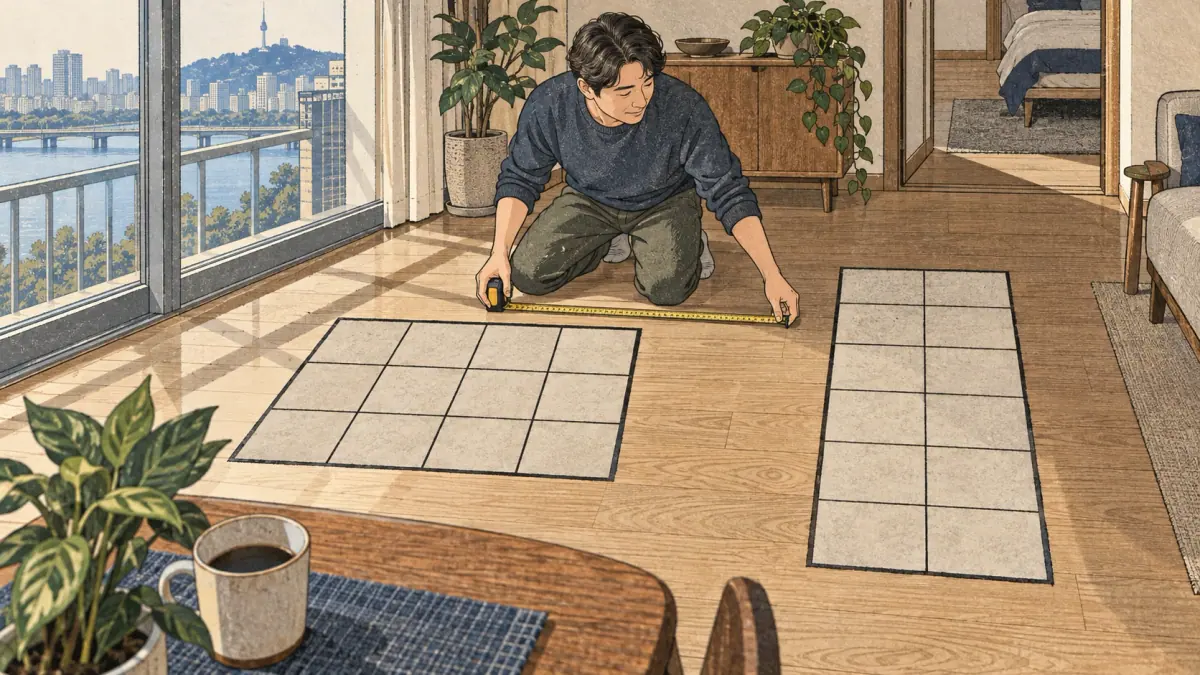
A pyeong is an area unit encountered in Korean housing conversations and property descriptions. The modern computational convention used here is exactly 400/121 square meters per pyeong, about 3.305785 square meters. A Korean government explanation supplies that fraction. The decimal approximation is useful for mental estimation; the fraction is the calculator's actual factor.
Pyeong measures area, not length. One pyeong does not determine a room's width, a ceiling height, the number of rooms or the amount of usable floor space. A rectangle, a square and an irregular shape can all have the same area. The label attached to the measurement tells you which spaces the number represents.
The Korean unit symbol is 평. Learn how quantities are expressed through Korean numbers in everyday measurements and Korean counters and units. Those lessons concern language; the calculator concerns physical conversion. Keeping those tasks separate makes the arithmetic easier to check.
Pyeong to Sq Ft and Square Meters: Exact Formulas
Pyeong to sq ft uses two exact constants: 400/121 m² per pyeong, and 0.3048 meters per international foot. The NIST conversion table establishes the foot. Squaring 0.3048 gives 0.09290304 m² per square foot. Multiplying a length factor once would produce the wrong area factor.
Let P mean an area in pyeong, M the same area in square meters and F the same area in square feet. The formulas are:
- M = P × 400/121.
- P = M × 121/400 = M × 0.3025.
- F = M ÷ 0.09290304.
- M = F × 0.09290304.
- F = P × 400/121 ÷ 0.09290304.
One pyeong is approximately 35.58 square feet when displayed to two decimal places. The word approximately applies to that display, not to the stored factor. The calculator represents the source as a fraction and derives every answer from it. Precision controls change only the printed digits.
For an independent check, 121 pyeong converts to exactly 400 m². A converter that treats 3.3058 as its exact factor will miss that equality. These formulas preserve the original area definition, which matters in the following housing examples.
Worked Examples for Korean Property Listings

Worked examples show both the arithmetic and the interpretation. The numbers below are illustrative measurements, not live listings, average apartment sizes or offers. Each result uses two displayed decimals unless stated otherwise.
59 M² of Exclusive Area
An exclusive-area figure of 59 m² converts by 59 × 121/400 = 17.8475 pyeong. The display is 17.85 pyeong. Dividing 59 by 0.09290304 gives 635.07 square feet after rounding. All three answers retain Exclusive as their basis.
The conversion does not add a share of corridors or stairways. If another line on the listing gives a larger supply area, enter that line separately and keep its own label. This avoids mixing the measured interior with a different total.
How Many Pyeong Is 84 M²?
An area of 84 m² is exactly 25.41 pyeong, because 84 × 0.3025 = 25.41. The same area is approximately 904.17 square feet. The answer remains 25.41 pyeong whether the source is labelled Exclusive, Supply or Unknown; changing the label does not change the physical factor.
An advertised description containing another pyeong number may refer to a larger area definition. The tool cannot infer which definition was intended. Obtain that second measurement rather than applying an assumed apartment ratio.
34 Pyeong of Supply Area
A declared supply area of 34 pyeong gives 34 × 400/121 = 112.396694… m². The display is 112.40 m² and 1,209.83 ft². These answers describe Supply area. The conversion is not an assertion that the home has 112.40 m² of exclusive interior.
Comparing this result directly with the earlier 84 m² exclusive example would compare different bases. Preserve both figures and request matching measurements before drawing a living-space conclusion.
A 1,000-Square-Foot Apartment
A source of 1,000 ft² gives exactly 92.90304 m². Multiplying that metric value by 0.3025 gives 28.1031696 pyeong, displayed as 28.10. Keep Unknown if the foreign listing does not define its floor-area measurement.
The international-foot conversion is precise, but cross-country housing labels may differ. A foreign gross area is not automatically the Korean supply-area category. Vocabulary helps identify the document's meaning before comparing the numbers.
Which Korean Area Label Does Your Number Use?
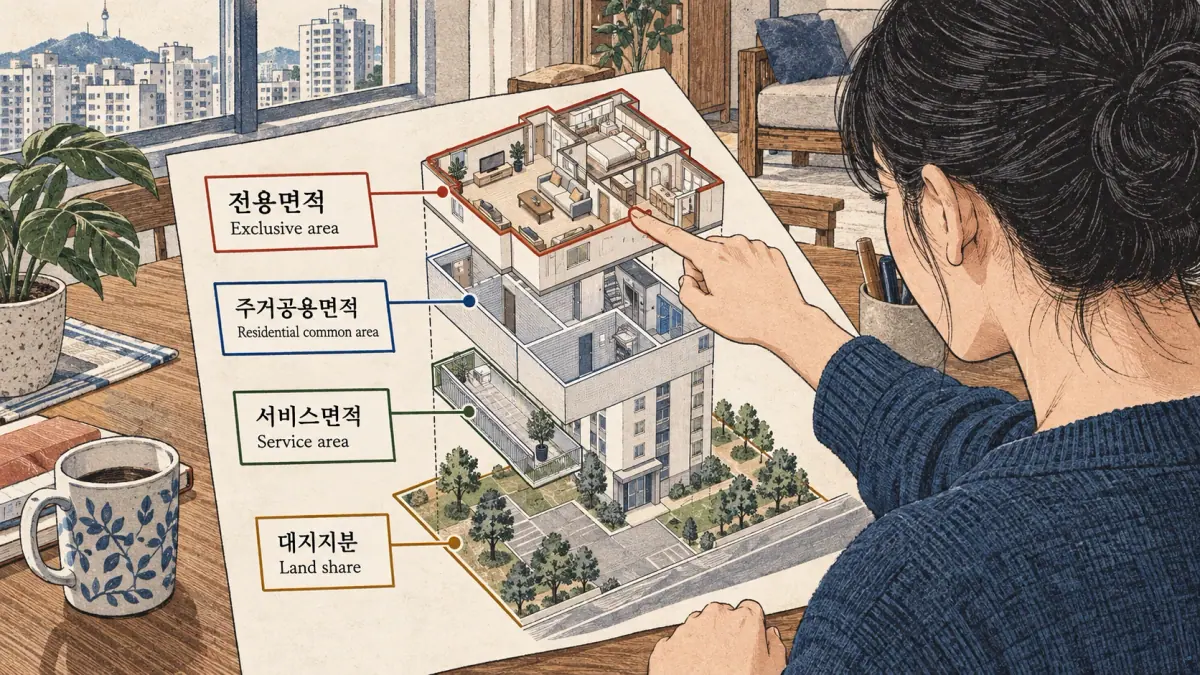
The source document determines the area basis. A number alone does not establish whether it describes private interior, shared residential space, another common area or land. The IBS housing measurement guide explains exclusive-use area; a government housing explanation distinguishes the component categories.
| Document term | English reading aid | Treatment in this tool |
|---|---|---|
| 전용면적 | Exclusive area | Retain the declared exclusive label |
| 주거공용면적 | Residential common area | Keep separate unless supplied components are added |
| 공급면적 | Supply area | Declared exclusive plus residential common |
| 계약면적 | Contract area | Declared supply plus other common |
| 서비스면적 | Service area | Keep separately declared service space separate |
| 대지지분 | Land share | Preserve the land label; do not add to floor area |
Exclusive and Residential Common Area
Exclusive and residential common measurements describe different categories. The tool keeps each category attached to its number instead of translating both into a loose English phrase such as apartment size. These English terms are reading aids, not promises of identical legal meanings across countries.
Supply and Contract Area
Supply and contract totals can involve different common-area components. Component mode adds only the measurements you explicitly declare. An unspecified component is not inferred from a building type, address or customary percentage.
Does a Balcony Belong in the Same Figure?
A balcony or other service space needs the document's actual classification. Do not automatically add its measured area to exclusive or supply totals. A larger physical impression does not change the conversion factor or settle the formal area definition.
Land Share Is a Separate Measurement
Land share concerns a separately labelled land measurement. Adding it to a home's interior floor area would create a misleading total. Use Korean renting and housing vocabulary to follow the surrounding document language, then confirm ambiguous labels with the source.
Why Can 84 M² and a Marketed Size Differ?
Two housing numbers can differ because they measure different sets of spaces. Unit conversion changes how one measurement is expressed. A change from exclusive to supply area changes the measurement being discussed. Distinguishing those operations resolves the apparent conflict without inventing a fixed apartment rule.
Two Actual Measurements, Two Converted Values
Suppose a document explicitly gives 84 m² Exclusive and 112 m² Supply for the same property. The exclusive figure converts to 25.41 pyeong; the supply figure converts to 33.88 pyeong. Both conversions can be correct. They are answers about two different measurements.
For those supplied figures, the exclusive-to-supply ratio is 84 ÷ 112 × 100 = 75%. The residential common difference is 112 − 84 = 28 m², provided the document uses the corresponding component relationship. The 75% is derived from these two numbers. It is not evidence that another building uses the same ratio.
Record where each measurement came from. A brochure, a contract and a conversation may use different definitions or precision. If the figures disagree, ask which document and which area basis each speaker means. Arithmetic cannot resolve a disagreement about the source category.
Percentage-Derived Scenarios
A scenario starts with an explicitly chosen percentage rather than two measured areas. With supply area 112 m² and a scenario ratio of 75%, the derived exclusive area is 112 × 0.75 = 84 m². With exclusive area 84 m² and the same ratio, derived supply area is 84 ÷ 0.75 = 112 m².
The two outputs match the earlier example mathematically, but their evidence differs. A percentage-derived result is a scenario until the actual measurement is supplied. The tool labels that provenance and begins with no assumed ratio. Zero percent cannot derive a supply total from an exclusive area because that operation would divide by zero. These boundaries keep the ratio feature useful without pretending to inspect a property.
Measure a Rectangle from Width and Length
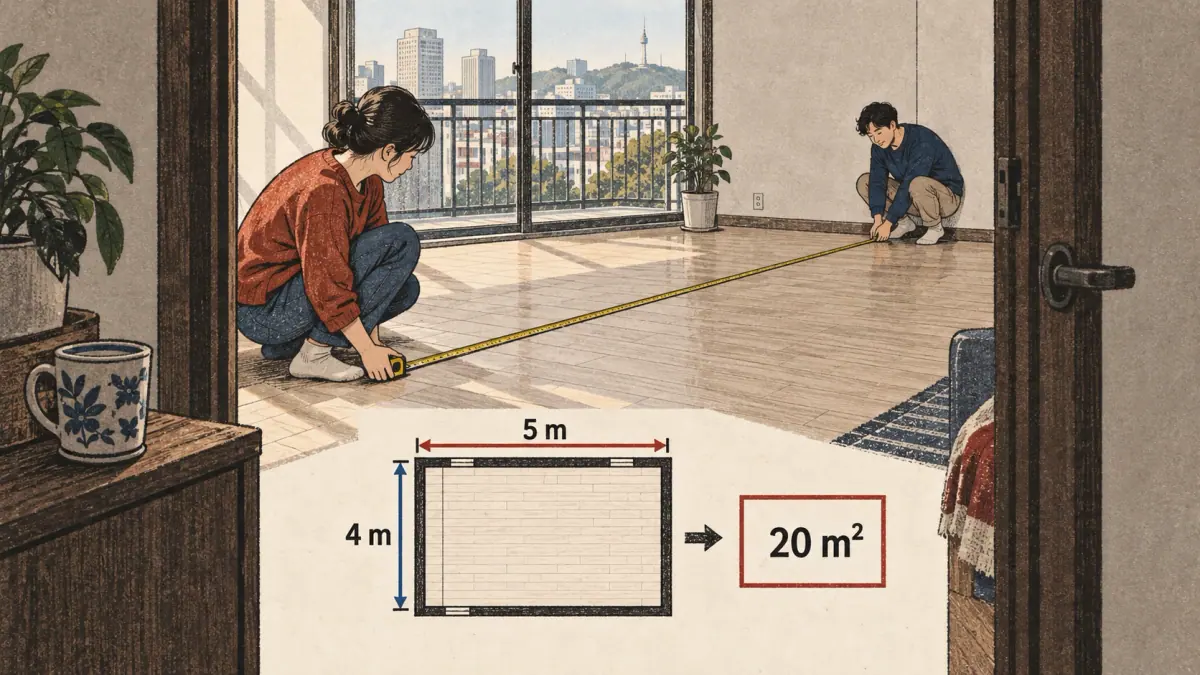
Rectangle mode computes area from two measured side lengths. Select the length unit for each side independently: meters, centimeters, feet or inches. The engine converts each length to meters before multiplying. A 5 m width and 4 m length give exactly 20 m², displayed as 6.05 pyeong and 215.28 square feet.
- Measure the two perpendicular sides of the rectangle.
- Enter each value with its own linear unit.
- Check that the area answer uses squared units.
- Keep the rectangle's result separate from any unmeasured rooms or common spaces.
An irregular room requires a suitable geometric method or measured plan. Dividing it into rectangles may be appropriate for a rough calculation, but the tool does not verify the measurements, wall boundaries or surveying method.
Can Area Alone Tell You the Room Dimensions?
An area alone cannot reveal actual width and length. Twenty square meters could be 5 × 4 m or 10 × 2 m. Settings offers a square illustration: if 20 m² were a square, its side would be approximately 4.47 m. That square root is an illustration, not a reconstructed floor plan.
Convert Centimeters and Feet before Multiplying
Five hundred centimeters by four hundred centimeters gives the same 20 m² as 5 m by 4 m. Ten feet by twelve feet gives 120 ft², approximately 11.15 m². The distinction between linear and squared units prevents a common factor error. Explore Korean measurement vocabulary for the words surrounding those dimensions.
Compare Two Homes on the Same Area Basis

A two-property comparison is strongest when both numbers describe the same area category. Enter Property A and Property B separately, preserving their original units and labels. The calculator reports B minus A and, when A is positive, that difference as a percentage of A.
For A = 84 m² Exclusive and B = 100 m² Exclusive, the difference is 16 m². The percentage is 16 ÷ 84 × 100 = 19.05% after rounding. Reversing the properties changes the denominator: a decrease measured relative to 100 m² is not the same percentage as an increase relative to 84 m².
What Happens When the Labels Do Not Match?
Mismatched or unknown labels produce the status “Different or unconfirmed area bases.” Arithmetic remains available, but a larger number alone does not establish more living space. A 112 m² Supply figure and an 84 m² Exclusive figure differ by 28 m²; that difference does not prove one home's exclusive interior is larger.
A Comparison Worksheet
A worksheet keeps the source context next to the arithmetic. The example below uses invented figures for practice, with both measurements explicitly labelled Exclusive.
| Field | Property A | Property B |
|---|---|---|
| Original area | 84 m² | 100 m² |
| Area basis | Exclusive | Exclusive |
| Converted pyeong | 25.41 | 30.25 |
| Source to confirm | Property document | Property document |
Before using a comparison, confirm the document date, area definition and whether both measurements refer to the same kind of space. Save or print only the information needed for your decision. Monetary comparisons require additional matching conditions.
Price per Pyeong, M² and Square Foot
Price per area divides a total amount by an area expressed in the chosen unit. The result retains the area basis, currency label and purchase or monthly-rent period. For an illustrative purchase price of KRW 900,000,000 and supply area of 34 pyeong, the price is KRW 26,470,588.24 per supply pyeong after rounding.
KRW is the default label. Choosing USD or EUR changes the label; it does not convert the amount. Enter amounts already expressed in the selected currency. A zero total produces zero per unit for a positive area. A zero area cannot be a denominator.
Can Two Price-per-Area Figures Be Compared?
Two rates require the same area basis, currency and period before they can support a direct comparison. Purchase price and monthly rent are different quantities. A deposit is not automatically rent, and the tool does not invent a deposit-to-rent conversion, tax adjustment or valuation forecast. An arithmetically lower rate is also not a complete judgement about condition, location or housing quality. Display precision deserves the same care as those labels.
Rounding, Separators and Large Values
Display rounding changes the printed answer while leaving the original fraction intact. The default is two decimals with half-up rounding: 0.005 m² displays as 0.01 m². Settings supports zero through ten decimal places and a significant-figure display. Exact fraction copying is distinct from ordinary rounded-result copying.
Why Can Converting a Rounded Answer Back Differ?
A rounded answer entered as a new source has less information than the original. One pyeong displays as 3.31 m². Entering 3.31 m² creates a new measurement of exactly 3.31 m², not the original 400/121 m² fraction. Use Swap to change source units while preserving the unrounded area; editing the swapped display deliberately starts a new source.
EN and ES Number Formats
English notation reads 1,234.5 as one thousand two hundred thirty-four point five. Spanish notation reads 1.234,5 as the same value. The text 1,234 means 1234 in English notation and 1.234 in Spanish notation. Select the intended format and check the interpreted value. Invalid groups, scientific notation and expressions are rejected rather than evaluated. The supported input has at most eighteen integer digits and twelve fractional digits; these are interface limits, not surveying standards.
Limits of This Pyeong to Sq Ft Converter
The pyeong to sq ft converter changes physical units and performs explicitly supplied arithmetic. It does not inspect a listing, establish an exclusive-area measurement, certify a survey or decide legal advertising compliance. Source labels and scenarios remain as reliable as the information you enter.
Korea's current measurement-law Article 6 addresses nonstatutory-unit use and includes conditions for accompanying statutory units. The implementing rule also matters. Commercial decisions require checking the applicable current provisions and circumstances with a qualified adviser. A blanket claim that every pyeong mention is always illegal would oversimplify that framework.
The formula sources were checked on 10 October 2026. For reading the resulting quantities, continue to Sino-Korean numbers or the Korean number converter. Use the established contact channel to report a numerical problem with its source input, unit and expected result.
Local Processing, Sharing and Offline Use
Ordinary calculations stay in the loaded browser page. Typing an area, price or document label does not send those values to a conversion service. No account or paid API is needed. History saving starts off; enable it deliberately before saving a conversion or favorite. A saved list holds at most twenty conversions, and browser storage can be denied or cleared.
A backup export gives you a separate file. Import accepts the converter's bounded, validated history format rather than arbitrary executable data. Delete removes saved conversions through the history controls. Reset clears the current working values. Those actions serve different purposes, so confirm which information you intend to keep before using them.
Sharing is initiated by your action. A copied link includes a versioned mathematical fragment and its nonprivate area basis; custom document labels and prices are excluded by default. File exports may include the information visibly selected for that report. Review a report before passing it to another person. CSV text fields neutralize spreadsheet formula prefixes, while JSON retains the exact numerical source representation.
The loaded calculator continues to work without a connection. Save tool offline requests a browser cache of the page's own assets; availability depends on the browser and storage permissions. Browser installation or Add to Home Screen is similarly platform dependent. Neither control promises that an uncached first visit can work offline. These practical boundaries distinguish calculation in memory from durable storage.
Frequently Asked Questions
Can I Enter Zero Pyeong?
Yes. Zero is a valid mathematical area and converts to zero in every supported area unit. Zero does not supply a useful denominator for price per area or an exclusive-to-supply ratio. The converter reports those divisions separately instead of treating zero as an invalid ordinary conversion.
Why Does the Calculator Use the International Foot?
The international foot is exactly 0.3048 meters, so its squared area factor is exactly 0.09290304 square meters. This is the documented convention for this converter. Historical survey-foot contexts use another definition and need the appropriate specialist conversion; this tool does not silently select a survey-foot mode.
Are Square Yards Available Too?
Yes. Square yards are available as an input unit alongside acres, hectares and smaller metric area units. One square yard is exactly nine square feet using the international foot. Select the squared unit deliberately: a yard of length is different from a square yard of area.
Can I Save a Conversion without an Account?
Yes. Enable local saving in History and choose Save current or Favorite current. The list holds at most twenty conversions on this browser and includes delete and backup export controls. Browser storage can be unavailable or cleared, so download a separate backup when you need a durable record.
Will a Copied Result Retain Its Area Label?
Yes. Ordinary copying includes the value, units and selected area basis, so an Exclusive result remains labelled Exclusive. Export also offers an English and Korean summary. Copy exact fraction keeps the unrounded square-meter rational; ordinary copying uses the selected display precision. Confirm a custom document label before distributing it.
Can the Converter Reload without a Connection?
The calculator works without a connection after its code has loaded. Save tool offline can cache its own page assets when the browser supports that feature and grants storage. A first visit without previously cached assets still needs a network. Offline saving and local conversion history are separate choices.
Return to Korean learning tools for related language tasks. Use the pyeong to sq ft result to compare the same measured area; confirm the area label in the property document.